Payments & Earnings
The Payments page gives you full visibility into your earnings and payment history.
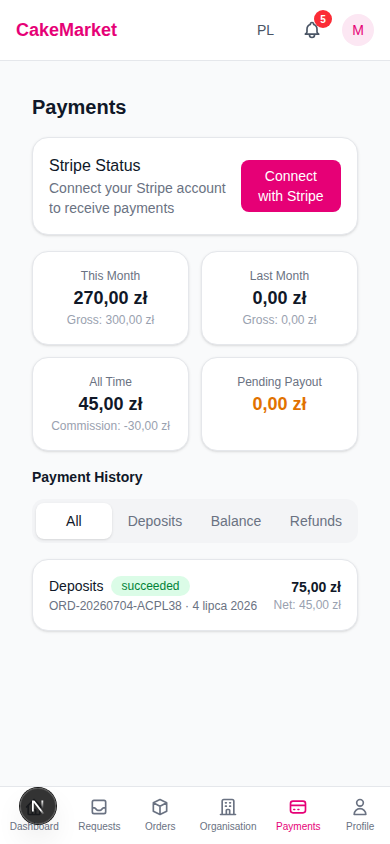
Stripe Connect
CakeMarket uses Stripe to process payments. You must connect your Stripe account before you can receive payouts.
Connecting Stripe
- Navigate to the Payments page
- Find the Stripe Status card
- Click "Connect with Stripe"
- You'll be redirected to Stripe's onboarding flow
- Complete the setup and return to CakeMarket
- A green "Connected" badge confirms your setup
Connecting Stripe is a required step in the setup checklist. You cannot activate your organisation without it.
Earnings Summary
Four cards show your earnings breakdown:
| Card | Shows |
|---|---|
| This Month | Net earnings this month (with gross in small text) |
| Last Month | Net earnings last month (with gross) |
| All Time | Total net earnings (with commission deducted) |
| Pending Payout | Amount awaiting payout (highlighted in amber) |
All amounts show net earnings (after the platform's 10% commission).
Payment History
A filterable list of all payment transactions.
Filters
| Filter | Shows |
|---|---|
| All | Every transaction |
| Deposits | Buyer deposit payments |
| Balance | Balance payments (online or offline) |
| Refunds | Refunded payments |
Transaction Details
Each record shows:
- Type — e.g., "Deposits", "Balance (offline)"
- Status badge — green: succeeded, yellow: pending, red: failed or refunded
- Order reference — Order number
- Date — When the transaction occurred
- Amount — Gross amount in PLN (red if refund)
- Net amount — Your share after commission
Commission & Escrow
CakeMarket charges a 10% commission on the total order price. Payments flow through the platform's escrow:
- The buyer's deposit and balance are collected by the platform
- On completion (buyer confirmation or 3-day auto-release), your net share — the collected amount minus the commission — is transferred to your Stripe account
- If you cancel before completion, every captured online payment (the Deposit and any online Balance) is refunded to the buyer; buyer cancellations follow the status-based policy
Commission details are visible in both the payment history and individual order details.
Invoices and customer documents
After the Order is completed, CakeMarket issues your Organisation an invoice only for CakeMarket's platform fee. You remain responsible for issuing any invoice or receipt required for the cake to the buyer and for providing the legally required food and allergen information. CakeMarket does not issue the buyer's cake invoice or receipt.