Profile & Reviews
Profile Settings
Access your profile from the hamburger menu → Profile.
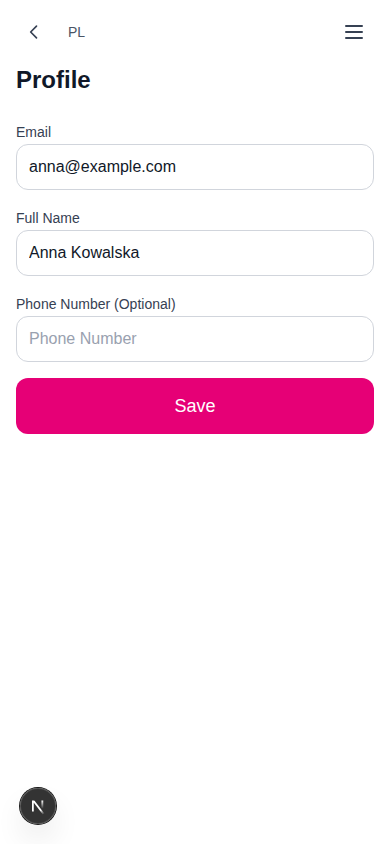
Editable Fields
| Field | Required | Description |
|---|---|---|
| — | Displayed but read-only | |
| Full Name | No | Your display name |
| Phone | No | Contact phone number |
Click Save to update.
Saved Preferences
When you submit a cake request while logged in, your choices (servings, event type, delivery method, address, pickup radius, flavour preferences) are saved and pre-filled the next time you open the wizard.
Leaving Reviews
After an order is marked completed, a "Leave a Review" button appears on the order card.
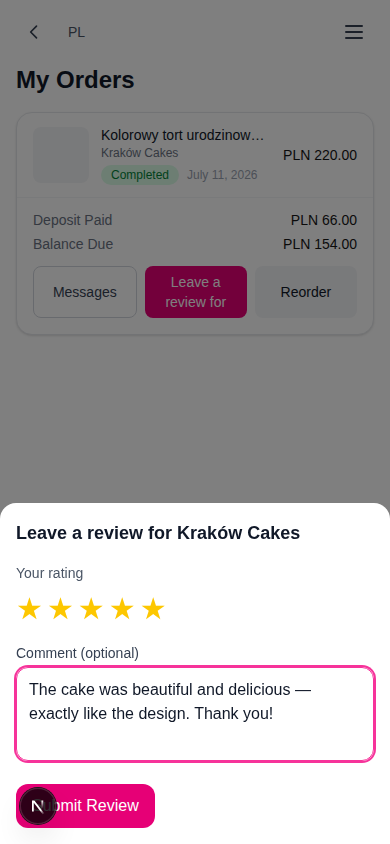
Review Form
| Field | Required | Description |
|---|---|---|
| Star Rating | Yes | 1–5 stars (interactive — hover to preview, click to select) |
| Comment | No | Written feedback about your experience |
Click "Submit" to post. The rating is required.
Review Rules
- You can only review completed orders
- You must be the order creator
- One review per order — you cannot review the same order twice
- Reviews are visible to other buyers on the seller's offer detail page
How Reviews Affect Sellers
- Reviews contribute to the seller's average rating (shown on offer cards)
- Rating accounts for 40% of the smart sort algorithm — higher-rated sellers appear first in the waiting room
- Sellers see their average rating on their dashboard
Guest-to-Account Conversion
If you started as a guest and want a full account, simply register from the welcome screen (or when prompted to log in from the waiting room). Your existing requests, orders, and preferences are linked to the new account automatically — your guest order appears straight away under My Orders:
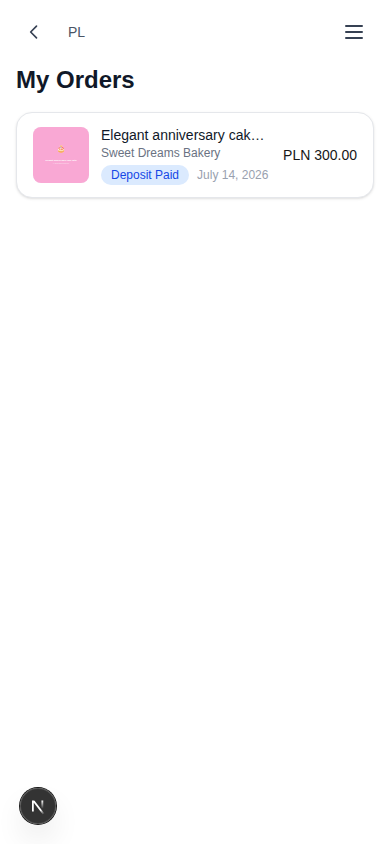
With an account you gain access to the Orders page, Profile, saved preferences, and messaging.