Admin Guide
The admin panel provides platform-wide oversight and management capabilities for CakeMarket administrators.
Access
Admin access is enforced at two levels:
- Cloudflare Zero Trust protects admin routes at the network level in production
- The server-only
ADMIN_USER_IDSallowlist restricts the admin API to immutable user database UUIDs as defence in depth
Unauthenticated users are automatically redirected to the home page.
Navigation
The admin panel has three active sections accessible via the top navigation bar:
| Section | Description |
|---|---|
| Dashboard | Platform statistics and quick actions |
| Organisations | All organisations, marketplace access, badge review and permanent deletion |
| Orders | All platform orders with filtering |
Dashboard
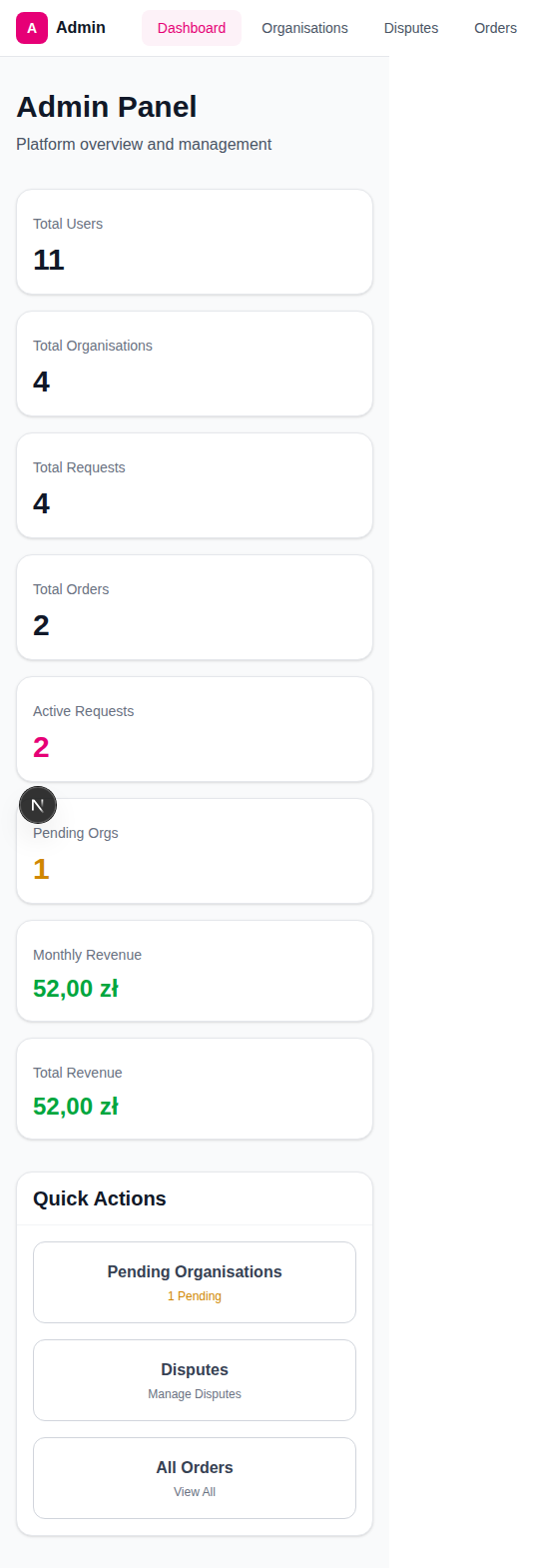
The dashboard provides a comprehensive overview of platform health.
Statistics Grid
Seven metrics displayed in a responsive grid:
| Metric | Description |
|---|---|
| Total Users | Registered user count |
| Total Organisations | All organisations on the platform |
| Total Requests | All cake requests ever created |
| Total Orders | All orders ever created |
| Active Requests | Currently active (non-expired) requests |
| Monthly Revenue | Platform commission earned this month (green) |
| Total Revenue | All-time platform commission (green) |
Revenue figures are calculated from the commission portion (10%) of all succeeded payments.
Quick Actions
The active shortcut buttons are:
| Button | Destination | Note |
|---|---|---|
| Organisations | /admin/organisations | View and manage every organisation |
| All Orders | /admin/orders | — |
Organisation Management
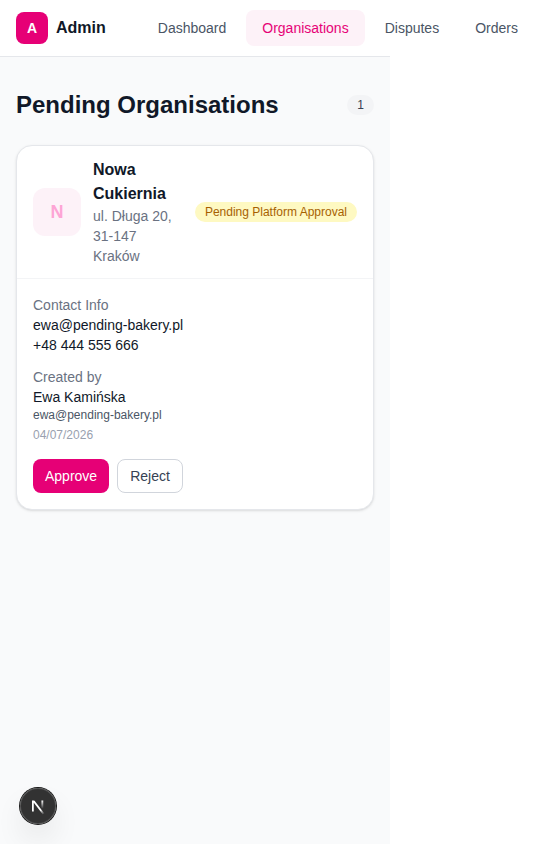
Viewing Organisations
The Organisations page lists every organisation and supports search and active, inactive and disabled filters. Each card shows:
- Organisation avatar (profile image or initial)
- Name and address
- Marketplace status (active, inactive or disabled)
- Contact information: Email and phone
- Creator details: Name, email, and registration date of the org admin
Marketplace Access
New organisations do not require platform approval. They activate automatically after required seller details and Stripe onboarding are complete.
- Disable immediately removes the organisation from marketplace matching and public visibility.
- Reactivate removes the platform block. It becomes active immediately only if the required seller details and Stripe onboarding are already complete.
- Organisation members receive an in-app notification when access changes.
Permanent Deletion
Permanent deletion is hidden in the expanded organisation details under Danger zone. It requires the exact organisation name, the exact phrase DELETE ALL COMPANY DATA, a separate acknowledgement checkbox and a final browser confirmation. It irreversibly removes the organisation and its company records, including memberships, offers, orders, messages, payments, reviews and stored files.
Optional Certificate Badge Management
A bakery may optionally upload a food-authority document. The file and its expiry date are private: only active administrators of that Organisation and authorised CakeMarket administrators can access them. Ordinary members and customers must never receive the document or its URL.
After reviewing a submission, an administrator may issue, change or revoke the public badge. The badge means only that CakeMarket reviewed the submitted document for display. It is not verification with the authority, an inspection, an endorsement, or a guarantee of compliance, food safety, or product quality.
CakeMarket does not adjudicate product, quality, delivery or fulfilment complaints. Buyers contact the seller directly; support may assist with use of the platform but does not decide the merits of the complaint.
Orders Overview
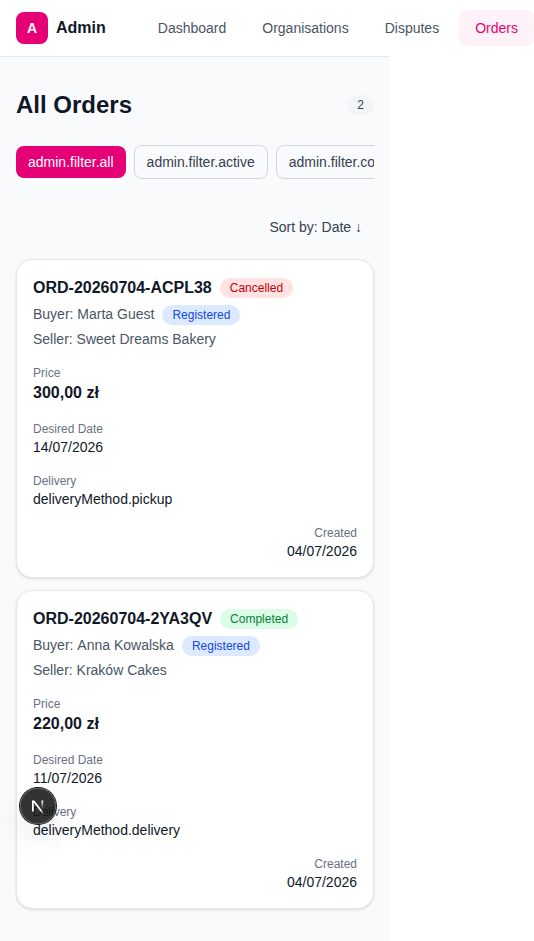
Viewing All Orders
The Orders page shows every order on the platform with filtering and sorting.
Filter Tabs
| Filter | Shows |
|---|---|
| All | Every order |
| Active | Orders in deposit_paid, in_progress, ready, or delivered status |
| Completed | Successfully completed orders |
| Cancelled | Cancelled orders |
The legacy disputed database value may appear in historical records only. It is retained for data compatibility and is not an active customer or admin workflow.
Sorting
Toggle between newest-first and oldest-first using the "Sort by: Date" button (arrow indicates direction).
Order Card Information
Each order displays:
| Field | Description |
|---|---|
| Order number | Unique order identifier |
| Status badge | Colour-coded current status |
| Buyer | Name + "Registered" (blue) or "Guest" (grey) badge |
| Seller | Organisation name |
| Price | Total order amount in PLN |
| Desired Date | When the cake is needed |
| Delivery Method | Pickup or delivery |
| Created Date | When the order was placed |
Automated Platform Processes
These background processes run on a schedule and may require admin awareness:
| Process | Schedule | Description |
|---|---|---|
| Request Expiry | Every few minutes | Expires active requests older than 24 hours |
| Hold Timer Cleanup | Every few minutes | Clears expired 10-minute hold timers on offers |
| Escrow Release | Every 15 minutes | Auto-releases escrow 3 days after delivery |
These are triggered via cron endpoints and do not require manual admin intervention.